



Review Added on July 24, 2019
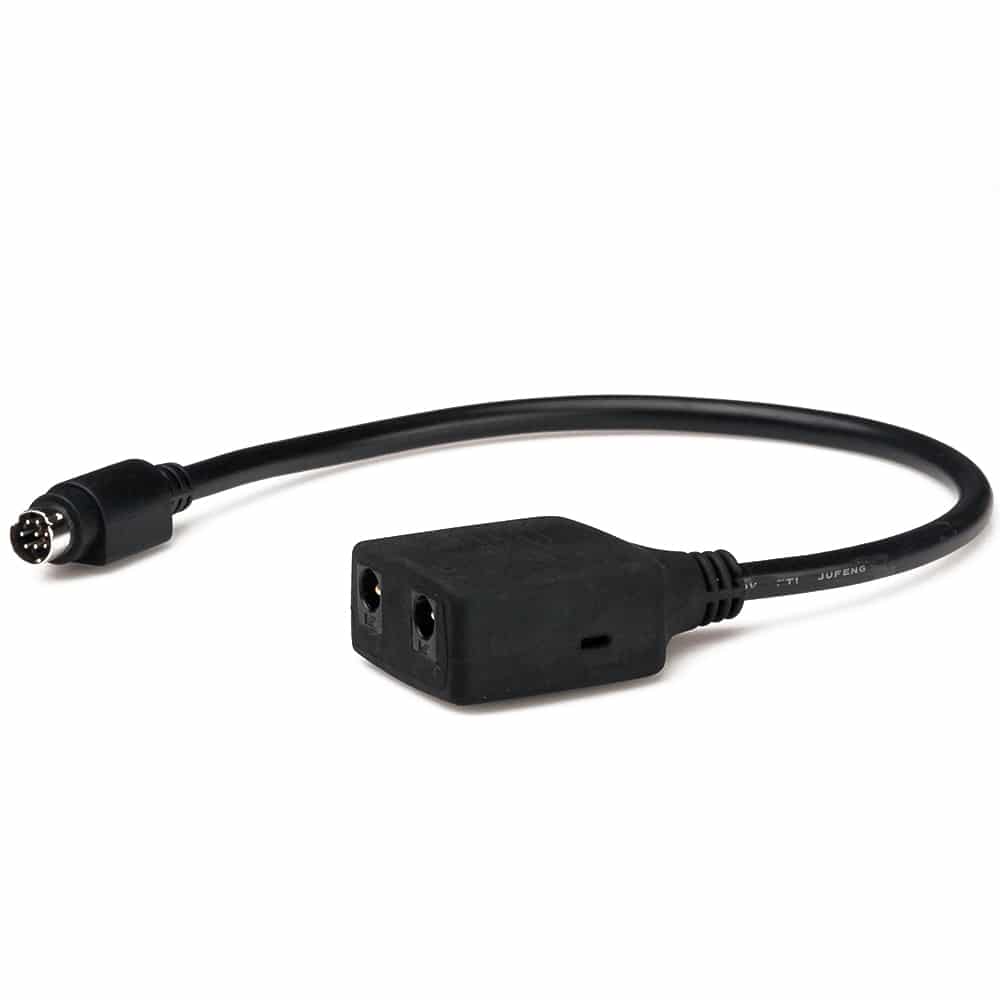
The FireBoard Drive is an accessory for the popular Fireboard remote food thermometer that allows the user to control the temperature of a charcoal or wood-fired cooker. It plugs into a connector on the right side of the thermometer and has jacks for a 12V power supply (included) and a fan. You can use any 12VDC fan with a 5.5mm plug or you can purchase one from FireBoard. The unit can be controlled from the same app that operates the thermometer or via a web page. This allows the user to observe and control the unit from anywhere an internet connection is available.
Setting Up the FireBoard Drive
Setup is easy. Simply plug the Drive into your FireBoard thermometer, attach the fan to your cooker, plug in the power supply (that will also charge the thermometer) and designate one of the six temperature probes as the input control source. You then set the target temperature for the cooker in the app, and away you go. You can also create cooking profiles with multiple steps, adjusting the target temperature in response to an expired time interval or a food temperature reached. When the time has elapsed or the food has reached a predetermined temperature, the app will adjust the target temp for the next interval. You can use this feature to automatically reduce the cooker temperature when the food is done, without lifting a finger. The app can generate notifications via e-mail, text messages, or simply sound an alarm.
Cook Test
I tested the unit while cooking a couple racks of baby back ribs on an 18.5″ Weber Smokey Mountain. I started the fire around 11:45 a.m., put the ribs on at 12:30 p.m. at 225°F, programmed the unit to drop the cooking temp at 5 p.m. to 160°, and then to shut down the cook after another two hours. The graph below shows this entire time interval. The Drive brought the temp up quickly and it then stabilized. As one would expect, the temp dropped when I opened the lid to add the food. I had set the open lid timer to five minutes. This interval prevents the unit from overreacting to a quick temperature drop when the lid is opened, which would otherwise create a spike in the cooker temperature.
When the drop is detected, the timer starts, and the fan won’t come on again until the set time has elapsed when the unit again will regulate the temperature normally. As you can see, the temperature regulation was very good, becoming excellent around 3:20 p.m. I asked the manufacturer about this, and they suggested that the fan was perhaps a little too powerful, and recommended that the maximum fan speed be limited (via the app) to about 30 percent. This makes sense to me, but I haven’t had an opportunity to test this hypothesis.

Temperature Monitoring In-App
The graph below comes from a screen capture on the FireBoard website where you can also control the Drive. At the time of the test, I could only create the program steps in the app, not on the website. However, my settings in the app were reflected on the web.
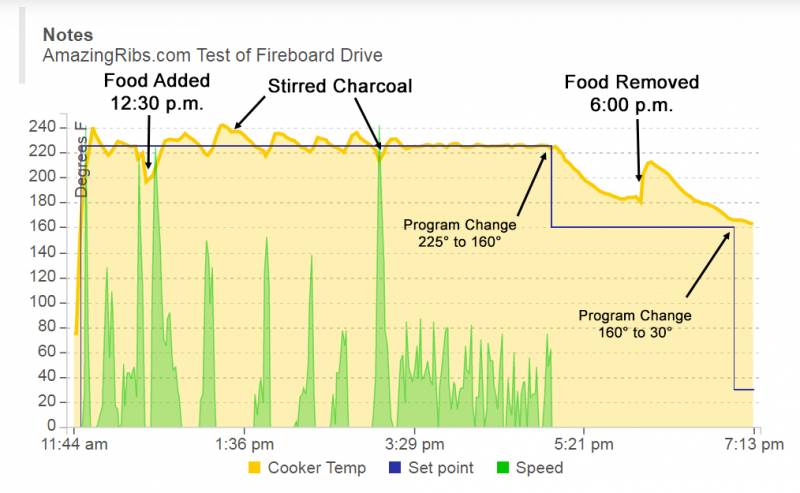
In the illustration above, the orange line represents the temperature in the cooker. The blue line is the set temperature – where I wanted it. The green graph shows the fan output on a scale of zero to 100 percent. You can click on the graph to see a larger version. Since I was cooking ribs, I didn’t make any attempt to measure the food temperature.
The app does not let you fine-tune the response of the control algorithm like the Auber SYL-2615, but the one-size-fits-all approach nevertheless works very well. Only geeks like me would care anyway.
Our Review of the FireBoard Drive
The Drive integrates seamlessly into the normal FireBoard app and is easy to navigate. If you already have the FireBoard thermometer system and you use a charcoal/wood smoker, this is an excellent addition to your cooking arsenal. We’re big fans of the FireBoard product line, and this new addition gets the coveted top award.




Before you can post a comment or question you must sign into our commenting partner, Disqus. This helps make sure everyone hanging around the grill is civil. We do not tolerate nastiness, racism, porn, inappropriate language, or attacks on others. All comments are the property of AmazingRibs.com and we reserve the right to quote them, edit them, delete them, and block people from making future comments.
Please leave comments and questions on the same page that is devoted to that subject so others can see questions and our answers when they are reading about the subject. You must enable JavaScript to use the comments section, and you must accept cookies to post comments. Note: the software that runs Disqus is different from the Pitmaster Club, so members need to sign into the Pitmaster Club separately.