



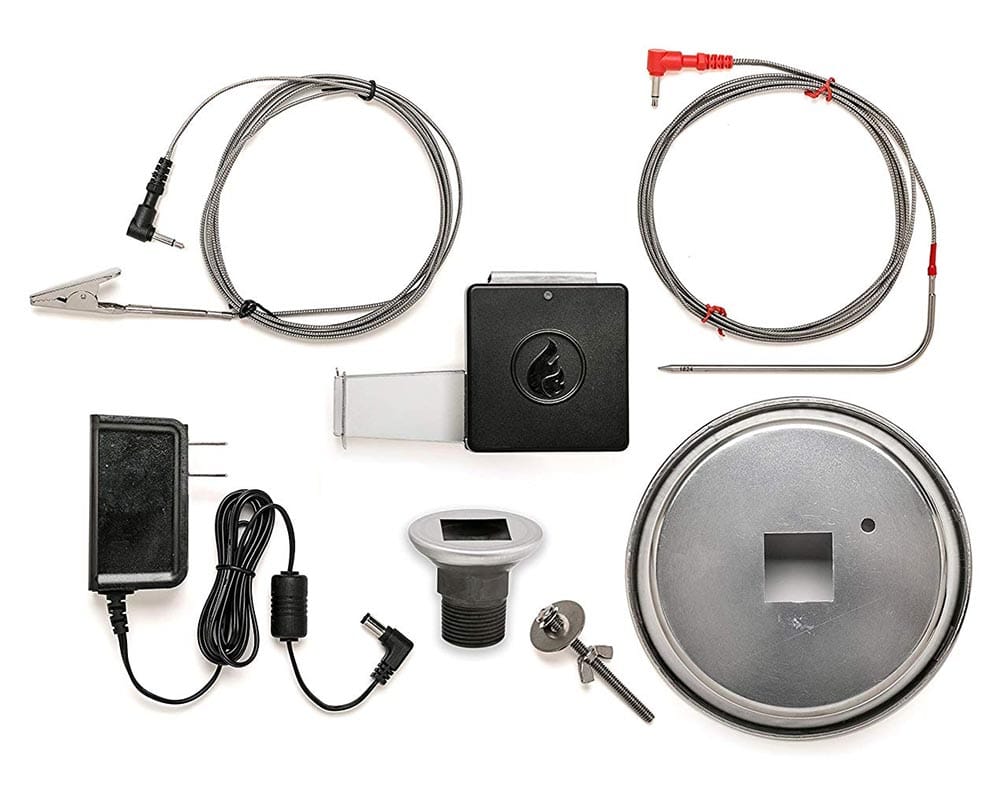
The Flame Boss FB400 Wi-Fi is a thermostatic controller designed to regulate the temperature of a charcoal-fired cooker like the Big Green Egg or the Weber Smokey Mountain. It works in conjunction with a free Android or iOS app or on the company’s website via any browser. It is easy to install and provides excellent temperature control.
Features
The unit comes with a manifold to attach the blower to the cooker’s lower vent. There is also a fitting for attaching the unit to a cooker with a threaded coupling. Intallation took only a couple of minutes and didn’t require any tools.
It includes two temperature probes, one for the cooker temperature and one for the food. The former provides feedback about the internal temperature of the cooker. The cooker temperature is compared to the target temperature set by the user. If the cooker temperature is below the desired value, the Flame Boss controller increases the power to the fan, increasing airflow. Increased airflow raises the temperature. Similarly, if the cooker temp is too high, the airflow reduces, and temperatures will drop. The trick with controllers like this is compensating for the lag between increased airflow and increased temperature. If the controller doesn’t add or subtract airflow in the right amounts, the temperature can fluctuate wildly. This controller was very well behaved.

Cook Tests
I conducted this test while cooking some ribs on a cool day (60°F, 13°C) with no wind on an 18.5 inch Weber Smokey Mountain. I filled the fuel tray about half full with Kingsford charcoal briquets and lit about a half chimney of the same fuel. Once the briquets in the chimney were covered with ash, I poured them on top of the unlit charcoal. Then I added some hickory and assembled the smoker. After the temp rose to my setting of 225°F, I removed the cover and put the ribs on the upper grate. I placed the temperature sensing probe about 2-3 inches from the food. I did not use a probe to track the meat temperature. Here is a graph of the temperature vs. time. (Click on image to enlarge.)
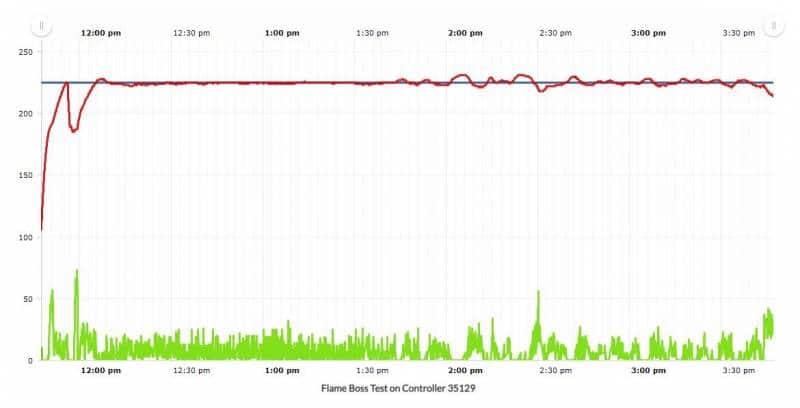
The temperature dip just before noon was the result of removing the cover to add the food. The controller sensed the rapid drop in temperature, alerted me that the cover had apparently been removed, and correctly delayed powering up the fan. After a minute or so, the controller resumed fan control and the temperature stabilized at my setting of 225°F. For the next two hours, the temperature barely fluctuated. After a couple of hours, the build-up of ash on the coals caused the temperature to begin to oscillate a bit. So, I jostled the fuel and the temp settled back down. As you can see from the graph, the fan output was only a small percentage of its capacity. This suggests that the unit could maintain temperature in much colder conditions. The temperature regulation is the best that I have observed to date.
Controlling the Flame Boss FB400 Wi-Fi
The 400 Wi-Fi has no controls or display on the hardware itself. Users must control it from a phone, tablet or web browser. It communicates with the cloud via the user’s home router, making its control functions and readouts accessible anywhere an Internet connection is available. Once the unit is set up with the SSID and password of the router, it will connect automatically when powered up. It remembers previous settings, so you could just plug it in and start cooking.
If you are using the thermometer, you can specify at what temperature the app will announce that the food is done. When that temp is reached, you can set it to reduce the cooker temperature to keep the food warm. The website mentions that you can set a timer, but I couldn’t figure out how to do that. Aside from audible/visible notifications generated by the app, you can also set up e-mail notifications if the cooker’s temp goes outside the limits you set or when the food is done.
I ran this test using an optional battery pack (YB1204500-USB) that can power the unit without the AC adapter. Its nameplate rating is 4500mAh at 12V or 9000mAh at 5V. It has five tiny LEDs that indicate its state of charge. I charged the battery fully before I began. After nearly five hours of use, including supplying power to another thermometer I used for data collection purposes, it still showed four lit LEDs, so the capacity should be more than adequate for even the longest cooks.
The Flame Boss Website
The Flame Boss FB400 Wi-Fi has only one food probe, but that is probably not a deal breaker for most cooks. The documentation for the app is on the sparse side. Apparently we’re supposed to be able to figure it all out by ourselves. I like that I can access and control the unit via a web browser. From the website, you can also download the raw data – time, temperature and fan data – but the data’s units are not specified. I had the target temp set at 225°F but the downloaded data showed 1072, and the fan’s numbers are similarly cryptic. Unless you plan to plot the data using Excel, this probably isn’t a big deal.
Our Review of the Flame Boss FB400 Wi-Fi
Setup is easy and the temperature control is excellent. The app has the basic functionality needed to control your cooking session, and the data is retained in the cloud. One minor glitch – and I do mean minor – is that the unit will not reconnect with the router if the router is shut off and then turned back on. You have to power down the controller and then power it back up to re-establish communication. The price is lower than most of its competitors. Plus, the quality of the unit and the temperature probes is good. Overall, this unit gets a Gold Medal for ease of use and performance.




Before you can post a comment or question you must sign into our commenting partner, Disqus. This helps make sure everyone hanging around the grill is civil. We do not tolerate nastiness, racism, porn, inappropriate language, or attacks on others. All comments are the property of AmazingRibs.com and we reserve the right to quote them, edit them, delete them, and block people from making future comments.
Please leave comments and questions on the same page that is devoted to that subject so others can see questions and our answers when they are reading about the subject. You must enable JavaScript to use the comments section, and you must accept cookies to post comments. Note: the software that runs Disqus is different from the Pitmaster Club, so members need to sign into the Pitmaster Club separately.