



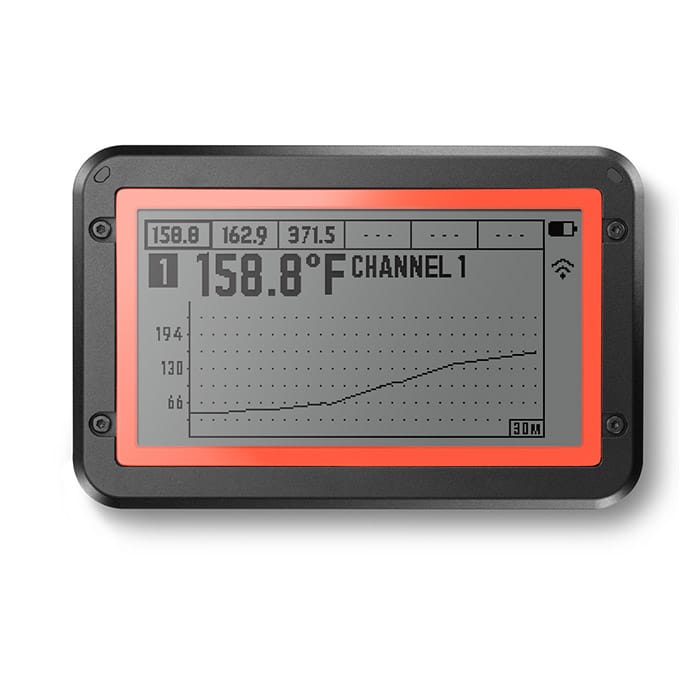

The Fireboard 2 Drive FBX2D, an evolution of the original Fireboard with an enhanced LCD display, is has ports for 6 probes for measuring meat and oven temp and Bluetooth/Wi-Fi with an integrated thermostatic controller that sets the standard for this product class. It hits all the high notes: well-thought out, solid construction, full feature set, an intuitive app, and clear, well-written instructions – in five languages, no less.
There are three versions of the FireBoard 2. The basic rechargeable FireBoard 2 can handle six thermistor probes for measuring both meats and the oven. Plus it can talk to your smartphone or computer via WiFi or Bluetooth. The FireBoard 2 Drive version has the thermostatic controller built in and with an optional 12v blower it can control the cooker temperature as well as monitor your meats. The FireBoard 2 Pro has ports for three type K thermocouple probes and the blower is an option for this one too.
Display
FireBoard 2 has large screen that displays the status of each channel, allowing the user to page through each probe’s temperature vs. time graph. Granted, the same information is available in the app or at FireBoard.io, but it’s still nice to be able to pick up the unit and see what’s happening at a glance.
Users of the original FireBoard will feel right at home. The app and the web interface are the same. But, the device itself now has a large screen that displays the status of each channel, allowing the user to page through each probe’s temperature vs. time graph. Granted, the same information is available in the app or at FireBoard.io, but it’s still nice to be able to pick up the unit and see what’s happening at a glance. If you have the Drive accessory from the original FireBoard, it will plug into even the basic unit, providing full thermostatic control functionality at a lower price.
Hungry for more ribs recipes, tips, and techniques? Click here to download our ebook “Amazing Ribs Made Easy” $3.99 on Amazon (free Kindle app runs on all computers and devices). Or, get this book and others FREE as a member of the AmazingRibs.com Pitmaster Club. Click here to join.
How to set up your Fireboard 2 Drive FBX2D
Setting up the FireBoard 2 is straightforward. Install the app on your smart phone or tablet. (Apple and Android are supported.) Turn on the Bluetooth transceiver on your device, turn on the FireBoard, and connect the two. Create an account via the app. The next step is to set up a Wi-Fi connection between your FireBoard and your 2.4GHz router. (It does not support 5GHz.) The FireBoard will remember your connection parameters and reconnect automatically the next time you fire it up. (If you do not configure a Wi-Fi connection, you still have control via Bluetooth. But you’ll be limited to staying within Bluetooth range.
With a Wi-Fi connection, you can monitor and control from anywhere you have an internet connection.) You can then set up your cooking profile via the app or a web browser connection to the FireBoard cloud. Now you can control and monitor your cooking session either through your mobile app or the browser. If you use Alexa or Google Assistant, the FireBoard supports these interfaces.
You can set up alarms that alert you to temperature thresholds for either your cooker or your food, up to six at a time. You can receive notification via e-mail, text message, or via the app. If you are using a temperature control fan on your charcoal or wood fired cooker, you can set the target temp for the cooking session. You can create cooking temperature profiles that will allow you to change the cooker’s temperature when food temps reach a certain level or after a time period has elapsed, all automatically.

Functionality
The functionality of the FireBoard 2 is the same as the original FireBoard (read our review here). But the display on the new model provides a much better picture of the cooking process. There are four views available to you: temperature displayed in LARGE numbers; a single-channel graph of temp vs. time; a similar graph but with the other channels’ temps shown along the top of the display (See the product photo, above); and a display of the six channels, each in its own pane. You can easily jump from one display to another as your needs change.
The main unit is about the same size as a pack of king-size cigarettes. Plus it has some heft, an indication of the overall build quality. Temperature accuracy is also very good, as can be seen from the accompanying data. There is an internal lithium-ion battery that should run the unit for about 30 hours. If you’re using a fan for temp control, you can also power the unit with its supplied external charger for indefinite time periods. The LCD is protected by a plastic shield and the external surfaces have a rubberized coating for protection.
Fireboard 2 Drive FBX2D Features
I am a stickler for good documentation, and most products fail to meet my expectations. Not so with the FireBoard. The manual is clearly written and comprehensive. In addition to English, the manual has sections in German, French, Italian and Spanish. The app and the web interface are easy to navigate. I actually prefer the web because the screen is larger, and I’m usually at my computer anyway. There are lots of customizable options for the techno-geeks like me, too. The manual also has an entire section on how to obtain technical support should you need it – you probably won’t. There is even guidance on how to set up your cooker and fire to get good temperature regulation.
I plan to run a comprehensive test on the Drive feature (the thermostatic controller functionality). However, I’m told by the company CEO that the algorithm in the FireBoard 2 is the same as the original product, so you can see how it performs here. If you are the proud owner of the earlier version, you can use your existing fan with the new model.
The $249 price tag includes the FireBoard module, a power supply, two temperature probes, a grill clip, and the user’s manual. Additional kits are available that include more probes and blower fans, at a higher price. There is a one year warranty on the module. The probes have a six month warranty. You can find contact info in the manual. If you have a blower from another manufacturer the company sells an accessory that connects it to FireBoard 2.
Our Review
Explore the world of Sous Vide Que, the ultimate marriage of water and smoke, by clicking here to download our ebook “Sous Vide Que Made Easy” for $3.99 on Amazon (free Kindle app runs on all computers). Or get the book and others FREE as a member of the AmazingRibs.com Pitmaster Club. Click here to join.
As you can probably guess, I’m a big fan of the Fireboard 2 Drive FBX2D. In fact, I use it to monitor all my testing of thermostatic controllers because the interface is so useful. It’s competitively priced, well-built, well-supported, and performs well. An easy Platinum Medal – one of the best products of the year.






Before you can post a comment or question you must sign into our commenting partner, Disqus. This helps make sure everyone hanging around the grill is civil. We do not tolerate nastiness, racism, porn, inappropriate language, or attacks on others. All comments are the property of AmazingRibs.com and we reserve the right to quote them, edit them, delete them, and block people from making future comments.
Please leave comments and questions on the same page that is devoted to that subject so others can see questions and our answers when they are reading about the subject. You must enable JavaScript to use the comments section, and you must accept cookies to post comments. Note: the software that runs Disqus is different from the Pitmaster Club, so members need to sign into the Pitmaster Club separately.